
Structure over noise
Positioning, flow, volatility and market structure become one read. Gamma is one of the engines underneath it — not the whole product.
Positioning, flow, gamma and market structure — translated into what matters, what changed, and what to watch next.
Know the regime. Know the levels. Know what makes it actionable.
Already subscribed? Sign in with Whop to verify your membership.
The output
Not another dashboard to interpret. A card that names the stance, the evidence behind it, the level that makes it actionable, and what would change GABE’s mind.
Example name · Bullishconfirming
Why GABE likes it
What makes it actionable
What would change GABE’s mind
Flow flipping put dominated, price losing the flip on acceptance, or the regime turning negative gamma. Each one is stated up front, not after the fact.
Schematic of the live card. Levels, flow and regime are resolved per ticker in the terminal — no figures here are a market read or a performance claim.
Why GABE
Positioning, flow, volatility and market structure become one read. Gamma is one of the engines underneath it — not the whole product.
GABE answers from retrieved levels, regime and flow values, each carrying its own timestamp. If a number wasn't retrieved, you get “I don't have that” instead of a guess.
Scans, hypothetical entries and end-of-day outcomes are captured once and kept. Nothing is backfilled after the fact to make a day look better.
Meet GABE
GABE — the Gamma Analytics & Briefing Engine — sits between the raw feeds and your morning. Positioning, flow, volatility and structure go in; a stance, the levels that matter and the conditions that invalidate them come out.

“GABE doesn’t guess. He shows his work.”
Options positioning, dealer gamma, premium flow, dark-pool prints, breadth, volatility and price — pulled live, each with its own session stamp.
Structure is reconciled into a regime: where the flip sits, which walls matter, whether flow confirms, and how fresh each input is.
A stance with conviction, the levels to work, the trigger that would put you in, and the condition that says stand aside.
Grounded AI read
Every input GABE uses is stamped with where it came from and when it was measured. Answers quote retrieved values, prior-session numbers are labelled as context, and anything that wasn’t retrieved comes back as “I don’t have that” — not a guess.
Structure first
Net GEX by strike frames the session: the flip that separates regimes, and the walls price has to work through.
The product
Each surface answers one question a trader actually asks. Click a tab or use the arrows.
“Should I even be trading right now?”
One decision card reconciles trend, breadth, volatility and positioning into a single stance — with the vintage of every input stamped on it, so you always know how fresh the read is.
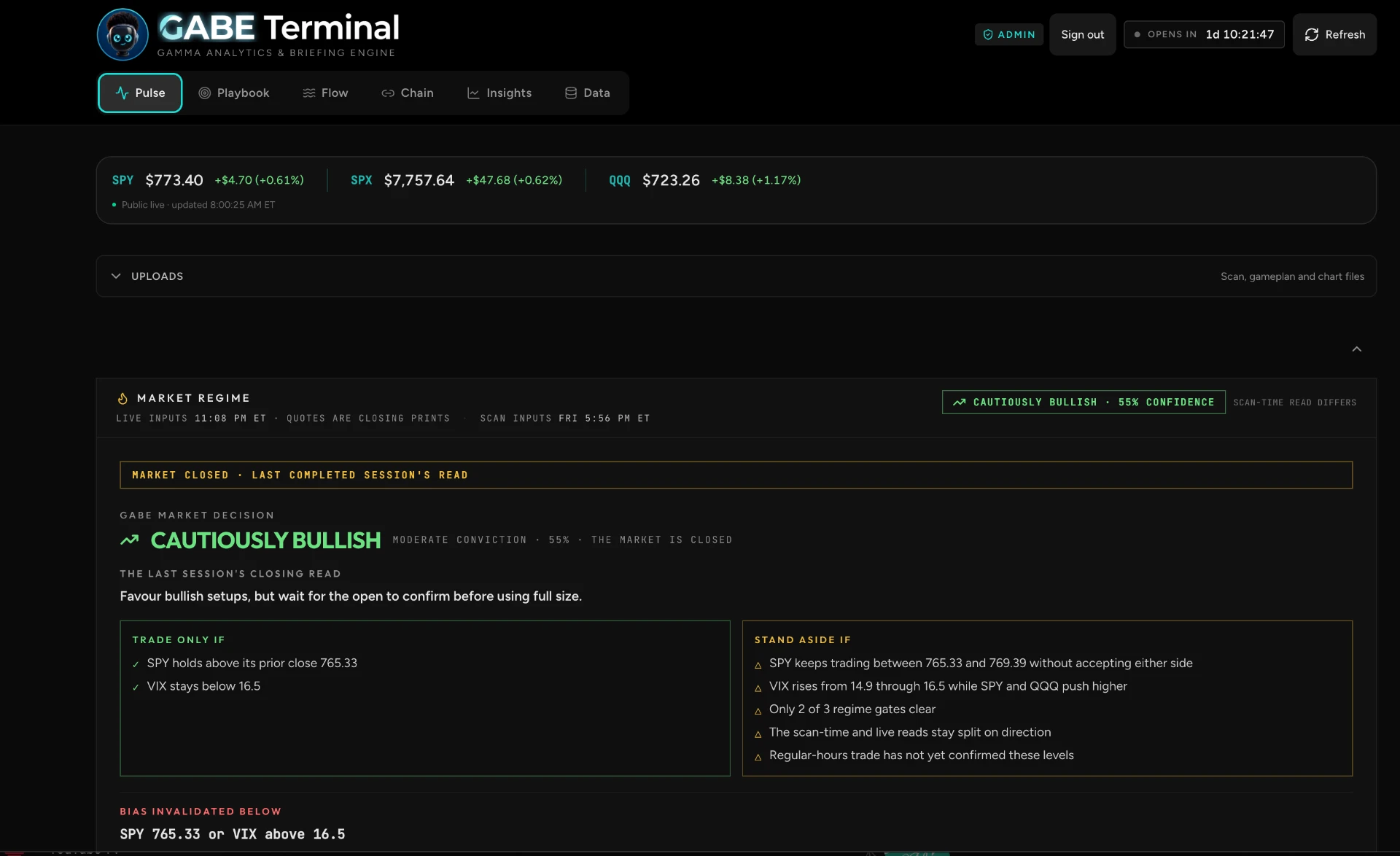
See the session's bias, conviction, and stand-aside triggers in one card.
How it works
One decision card: stance, conviction, the conditions that would make you trade, and the ones that say stand aside.
Per-ticker call wall, put wall and gamma flip drawn as conditional paths with a target ladder — so you know your invalidation before entry.
End-of-day recaps, an equal-weight basket benchmarked against SPY, and a paper book of hypothetical entries you can audit.
Pricing
One membership unlocks every surface. 7-day free trial, then $50/month — cancel during the trial and you are not charged.
Full access to Pulse, Playbook, Flow, Chain, Insights and Data. Cancel anytime through Whop.
Cancel anytime during the trial and you are not charged. Billing and cancellation are handled by Whop.
Questions
Yes. Every terminal surface sits behind an active membership — you sign in with Whop and the membership is verified server-side on each visit. Start the 7-day free trial to get in; without an active membership the pages do not render.
Start the 7-day free trial from the pricing section. Whop's secure checkout takes your details but does not charge you during the trial; after 7 days the membership renews at $50 per month. Cancel any time before the trial ends in Whop and you are not charged. Your membership is linked to your account automatically.
Options exposure, flow and price data come from market data vendors and are shown with the session and timestamp they were captured at. If a feed is unreachable or the market is closed, the terminal says so rather than showing a stale figure as live.
GABE only answers from values retrieved for your question — levels, regime inputs, flow and the current scan. If a number wasn't retrieved, it says it doesn't have it instead of estimating.
Only with a stated sample size, and never under 30 closed observations. Below that the terminal shows nothing rather than a flattering statistic with a caveat.
It is the trading community that builds and runs GABE Terminal. GABE Terminal is the product; AI Trading Collective is the desk behind it, and your membership includes access to its private Discord.
No. GABE Terminal is market data and analysis for informational purposes only. Every directive surface carries the same disclaimer, and the paper book records hypothetical entries — not executed trades.
Start the free trial and unlock every surface. Cancel during the trial and you are not charged.